

Having an empty bin will not ensure that your vacuum will pick up dirt. It can also depend on how the floor head allows debris to enter the vacuum, brushes working properly and air passing through the hoses and filters. Determine what kind of debris it is not picking up and on what surface. From there you can look at what may be the cause by adjusting settings and checking accessible items. The manufacturer will have you troubleshoot brushes, obstructions and filters separately from having an empty bin.[1][4]
Use the leftovers to choose a check
Look at whether it is not picking up fine dirt, larger particles or hair. It could also be failing to pick up on one surface such as carpet or hard floors. This can guide you in what to look at but will not point to a defective part.
| What remains | Check first | What the clue cannot prove |
|---|---|---|
| Larger crumbs remain, but finer debris disappears | Permitted head height or debris setting | That suction is fully restored or unrestricted |
| Hair or embedded dirt remains mainly on carpet | Carpet compatibility, brush setting, and wrapped brush material | That the brush motor or drive has failed |
| Ordinary debris remains across surfaces and normal attachments | Accessible passages, filters, and correct reassembly | That the main motor needs replacement |
Let's say it is not picking up crumbs on hard floors. You may think your vacuum is not sucking enough. But it is picking up finer particles and it may be hard to push the vacuum head across the floor. This would lead me to look at the floor head being set too high or low. BISSELL states that if you have one of their CleanView/PowerClean vacuums and are not picking up larger particles you should adjust the height of the head. Not all vacuums will have this setting.[2]
If your vacuum allows it, try to pick up similar particles that are already on the floor with the normal attachment. If you are able to pick up more with the attachment, then it could be your floor head or the hose leading to the head. Make sure you are following the manufacturer's instructions for attachments and do not remove any parts to see if suction improves.[3][6]
Match and inspect the floor head
Set your vacuum to what is recommended for both your vacuum and the surface. It may not always be the lowest setting for your vacuum. Dyson states that the UP30 should be on a higher setting when picking up larger particles and lower when picking up fine dirt. Their brush also should be on for some settings and not others. Shaw says that most carpets should be vacuumed on the brush setting but that you should use suction only or lift the brush if you have shag carpet that has a longer yarn length.[5][6]
Make sure your vacuum is turned off and unplugged if it has a cord. If your vacuum does not have a cord, make sure you are following the proper steps to turn it off and disconnect the battery. Do not take apart your vacuum if it has a permanent battery installed. Instructions for some vacuums such as the Dyson SV28 state that you should remove the battery before cleaning or maintenance.[1][3]
Check your inlet and brush for any particles or hair. Remove the cover and/or brush if your manual allows you to. Follow the manufacturer's instructions to remove them. Once everything is back together, check that your brush is working or, if your vacuum has a light for the brush, see if it is on. If the brush is not working, your problem is with the head, not suction.[1][3][4]
Check passages and filter permissions
Turn your vacuum off and unplug it if necessary. Check your hose and any other hoses that your manual tells you to. You may still have an obstruction after you empty your bin. Only remove parts that the manual instructs you to remove and do not poke into hoses you cannot see or remove the motor casing. Make sure everything is back in place before using your vacuum again. Hoses should be connected properly and your bin closed and any filters put back in place.[1][3][4]
Know your filters and what they can do. Just because your filter may look like another that is washable does not mean it is. The Dyson DC47 tells you to clean two of its filters. The Miele will tell you that you cannot wash your fine dust filter and prefilter.[4][7]
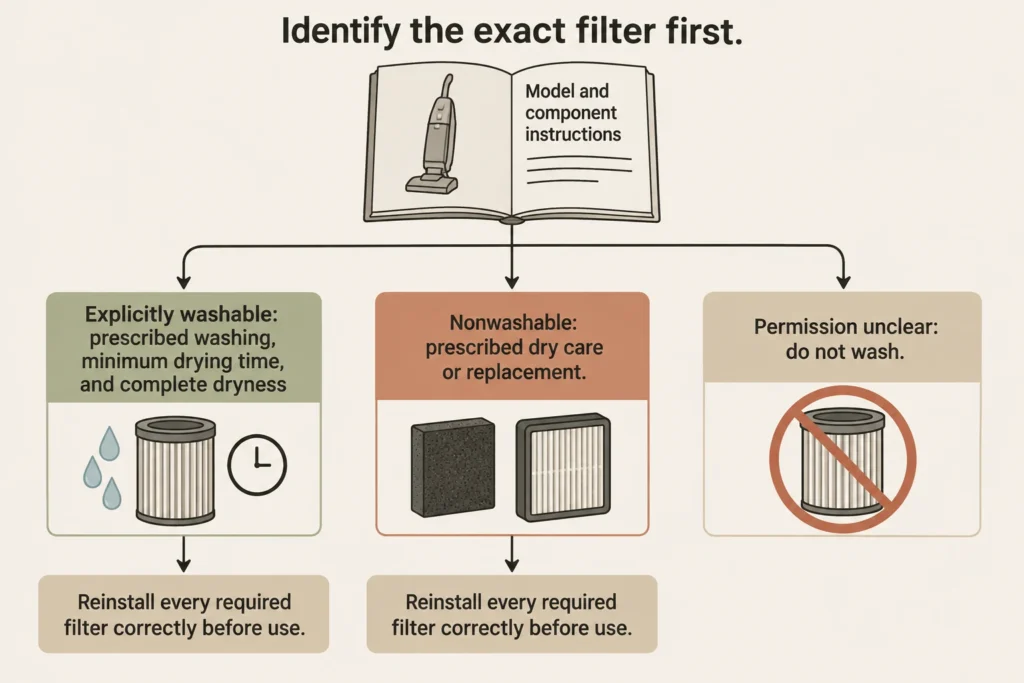
If you can wash your filter, make sure you know what you can use and how long to let it dry. Some manuals will tell you to use cold water and allow the filter to dry for at least 24 hours and to be completely dry before putting it back in your vacuum. 24 hours may not be enough time to ensure it is dry and not all vacuums will be the same. Do not run your vacuum without filters and/or a bin to see if your issue goes away.[3][7]
Retest before buying parts
Take your vacuum out on a similar dirty spot that you have had problems with before. Try to keep your floor type, particles on the floor and number of passes the same. Look at what your vacuum is leaving behind, not how loud the vacuum is. You are not trying to get factory levels of suction, just better than you were getting before.
If your problem persists after following these steps you may need to call your support line and explain what surfaces and debris you are having trouble picking up. Also mention what settings your on and what you have done so far. If your brush is not working or your vacuum is not picking up anywhere you should take it in for service. Don't assume it's the motor and replace it. Once you have your problem repaired decide if you want to keep your vacuum.[1][3]
Sources and references
- Shark: Upright Vacuums Maintenance and Most Common Inquiries
- BISSELL: Hard to Push: CleanView/PowerClean Vacuums
- Dyson: Dyson SV28 US user manual, document 419641-01
- Miele USA: Cleaning performance is reduced: Triflex
- Shaw Floors: Carpet Care
- Dyson: Dyson UP30 US user manual, document 405866-01
- Dyson: Dyson DC47 US operating instructions, document 25451-01